

In this section we will discuss how can we connect to the database in servlet.
Database Connectivity in Servlet
In this section we will discuss how can we connect to the database in servlet.
In this example I used the MS Access to connect the database. To connect with MS Access there are some steps that should be followed :
- Create a MS Access database file (as I created myServlet.mdb)
- To use the JDBC-ODBC Bridge driver, we have required to create a DSN (Data Source Name) which shows the connection of an ODBC to a specific server. To create a DSN follow these steps :
- Now we are able to connect the database using java servlet.
* Run MS Access -> 'Blank Access Database' -> Enter File name with '.mdb' extension.
* Create table by double clicking on "Create table in Design view".
*Define the columns and save the table (as I saved 'servlet')
* Go to Control panel -> Administrative tools -> Data Sources (ODBC).
* In the ODBC Data Source Administrator select the tab System DSN -> Click on Add button -> select MS Access Driver (*.mdb) -> click on Finish button.
* In the ODBC Microsoft Access Setup fill the headers according to their field, and then select the 'Select' button.
* In the Select Database dialog box select the directory where your file is stored and give the name in the place of the Database Name ( I give myServlet.mdb) and then press OK -> OK -> OK.
Example :
ConnectDb.java
import java.io.IOException;
import java.io.PrintWriter;
import java.sql.Connection;
import java.sql.DriverManager;
import java.sql.ResultSet;
import java.sql.SQLException;
import java.sql.Statement;
import javax.servlet.ServletException;
import javax.servlet.http.HttpServlet;
import javax.servlet.http.HttpServletRequest;
import javax.servlet.http.HttpServletResponse;

public class ConnectDb extends HttpServlet {
public void doGet(HttpServletRequest req, HttpServletResponse res)
throws IOException, ServletException {
res.setContentType("text/html");
PrintWriter pw = res.getWriter();
Connection con = null;
Statement stmt = null;
ResultSet rs = null;
try {
Class.forName("sun.jdbc.odbc.JdbcOdbcDriver");
con = DriverManager.getConnection("jdbc:odbc:myServlet");
stmt = con.createStatement();
rs = stmt.executeQuery("SELECT* FROM servlet");
pw.println("Id \t \t Name \t \t Place<br>");
while (rs.next()) {
pw.println("\t \t \t \t \t");
pw.println(rs.getObject(1).toString());
pw.println(rs.getObject(2).toString());
pw.println(rs.getObject(3).toString());
pw.println("<br>");
}
} catch (SQLException e) {
pw.println(e.getNextException());
} catch (ClassNotFoundException e) {
pw.println(e.getException());
} finally {
try {
if (rs != null) {
rs.close();
rs = null;
}
if (stmt != null) {
stmt.close();
stmt = null;
}
if (con != null) {
con.close();
con = null;
}
} catch (Exception e) {
pw.close();
}
}
}
}
web.xml
<?xml version="1.0" encoding="UTF-8"?>
<web-app id="WebApp_ID" version="2.4" xmlns="http://java.sun.com/xml/ns/j2ee" xmlns:xsi="http://www.w3.org/2001/XMLSchema-instance" xsi:schemaLocation="http://java.sun.com/xml/ns/j2ee http://java.sun.com/xml/ns/j2ee/web-app_2_4.xsd">
<display-name>dbconnection</display-name>
<servlet>
<servlet-name>ConnectDb</servlet-name>
<servlet-class>ConnectDb</servlet-class>
</servlet>
<servlet-mapping>
<servlet-name>ConnectDb</servlet-name>
<url-pattern>/ConnectDb</url-pattern>
</servlet-mapping>
</web-app>
Output :
At first we will create a database
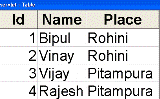
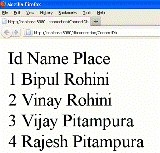
When you will execute the above example you will get the following example :
[ 0 ] Comments