

This section contains the detail about Multithreading in java.
Introduction to Multithreading
Many applications can run on the same computer at the same time. Each instance, in the running condition, is known as process. Each process can have one or more threads. A thread is a sequence of code, this code is often responsible for one aspect of the program, or one task a program has been given. For instance a program doing a complex long calculation may split into two threads, one to keep a user interface responsive, and one (or more) to progress through the lengthy calculation.
Java has a built in support for multithreading programming. A multithreading is a specialized form of multitasking. Multitasking threads require less overhead than multitasking processes.
Life Cycle of a Thread
A thread has various stages during it's life cycle. For example, a thread is born, started, runs, and then dies. Given below diagram contains various stages during it's life cycle :
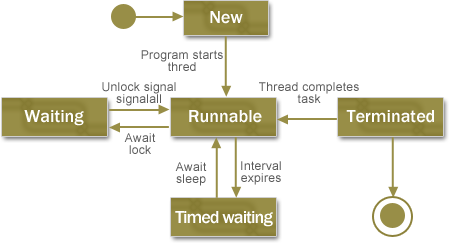
The description of the stages of a thread during it's life cycle are given below :
| Life Cycle Stage | Description |
| New | A new thread begins its life cycle in the new state. It remains in
this state until the program starts the thread. It is also referred to as a born thread. |
| Runnable | After thread born in 'New' Stage, the thread becomes runnable. A
thread in this state is considered to be executing its task. |
| Waiting | A runnable thread can enter the timed waiting state for a specified
interval of time. A thread in this state transitions back to the runnable state when that time interval expires or when the event it is waiting for occurs. |
| Timed Waiting | A runnable thread can enter the timed waiting state for a specified
interval of time. A thread in this state transitions back to the runnable state when that time interval expires or when the event it is waiting for occurs. |
| Terminated | A runnable thread enters the terminated state when it completes its
task or otherwise terminates. |
Thread Priorities
In java, each thread has a priority. It helps the operating system determine the order in which threads are scheduled.
Threads with higher priority are more important to a program and should be allocated processor time before lower-priority threads. However, thread priorities cannot guarantee the order in which threads execute and very much platform dependent. Java priorities are in the range between MIN_PRIORITY (a constant of 1) and MAX_PRIORITY (a constant of 10). By default, every thread is given priority NORM_PRIORITY (a constant of 5).
Thread Creation
You can create Thread in two ways :
- By implementing the Runnable Interface
- By extending the Thread class itself.
Creating Thread by implementing Runnable
This is the easiest way for creating thread. For this you need to create a class that implements the Runnable interface. Given below example demonstrate about this:
class ThreadDemo implements Runnable {
	Thread t;

	ThreadDemo() {
		// Create a new, second thread
		t = new Thread(this, "Demo Thread");
		System.out.println("Child thread: " + t);
		t.start(); // Start the thread
	}

	// This is the entry point for the second thread.
	public void run() {
		try {
			for (int i = 5; i > 0; i--) {
				System.out.println("Child Thread: " + i);
				// Let the thread sleep for a while.
				Thread.sleep(500);
			}
		} catch (InterruptedException e) {
			System.out.println("Child interrupted.");
		}
		System.out.println("Exiting child thread.");
	}
}

public class ThreadRunnableDemo {
	public static void main(String args[]) {
		new ThreadRunnableDemo(); // create a new thread
		try {
			for (int i = 5; i > 0; i--) {
				System.out.println("Main Thread: " + i);
				Thread.sleep(1000);

			}
		} catch (InterruptedException e) {
			System.out.println("Main thread interrupted.");
		}
		new ThreadDemo();
		System.out.println("Main thread exiting.");
	}

}
Output :
|
C:\Program Files\Java\jdk1.6.0_18\bin>java ThreadRunnableDemo Main Thread: 5 Main Thread: 4 Main Thread: 3 Main Thread: 2 Main Thread: 1 Child thread: Thread[Demo Thread,5,main] Main thread exiting. Child Thread: 5 Child Thread: 4 Child Thread: 3 Child Thread: 2 Child Thread: 1 Exiting child thread. |
Create Thread By extending Thread
You can also create Thread by extending it. For this need to create a new class that extends Thread, and then to create an instance of that class. Given below the demonstration of this :
class NewThread extends Thread {
	NewThread() {
		// Create a new, second thread
		super("Demo Thread");
		System.out.println("Child thread: " + this);
		start(); // Start the thread
	}

	// This is the entry point for the second thread.
	public void run() {
		try {
			for (int i = 5; i > 0; i--) {
				System.out.println("Child Thread: " + i);
				// Let the thread sleep for a while.
				Thread.sleep(500);
			}
		} catch (InterruptedException e) {
			System.out.println("Child interrupted.");
		}
		System.out.println("Exiting child thread.");
	}
}

public class ThreadExtendDemo {
	public static void main(String args[]) {
		new NewThread(); // create a new thread
		try {
			for (int i = 5; i > 0; i--) {
				System.out.println("Main Thread: " + i);
				Thread.sleep(1000);
			}
		} catch (InterruptedException e) {
			System.out.println("Main thread interrupted.");
		}
		System.out.println("Main thread exiting.");
	}
}
Output :
|
C:\Program Files\Java\jdk1.6.0_18\bin>java ThreadExtendDemo Child thread: Thread[Demo Thread,5,main] Main Thread: 5 Child Thread: 5 Child Thread: 4 Main Thread: 4 Child Thread: 3 Child Thread: 2 Child Thread: 1 Main Thread: 3 Exiting child thread. Main Thread: 2 Main Thread: 1 Main thread exiting. |
[ 0 ] Comments